
LiveKit SIP trunk and phone numbers








A carrier under your LiveKit stack, not another platform on top of it
LiveKit gives you the agent runtime, the media plane, the SDKs and the room logic. It does not give you phone numbers, carrier interconnects or a PSTN footprint. That is the layer underneath, and that layer is all didlogic does.
We run our own Autonomous System (AS13006), 12 physical points of presence and around 240 direct carrier agreements, and we have been carrying voice since 2006. We do not sell an agent platform, an LLM product or a conversational AI tool. Nothing we ship competes with the stack you chose LiveKit to stay open on.
That is worth checking when you compare providers. Several SIP vendors now sell their own voice AI platform next to their trunks, which puts them on both sides of the table. We only have one side.
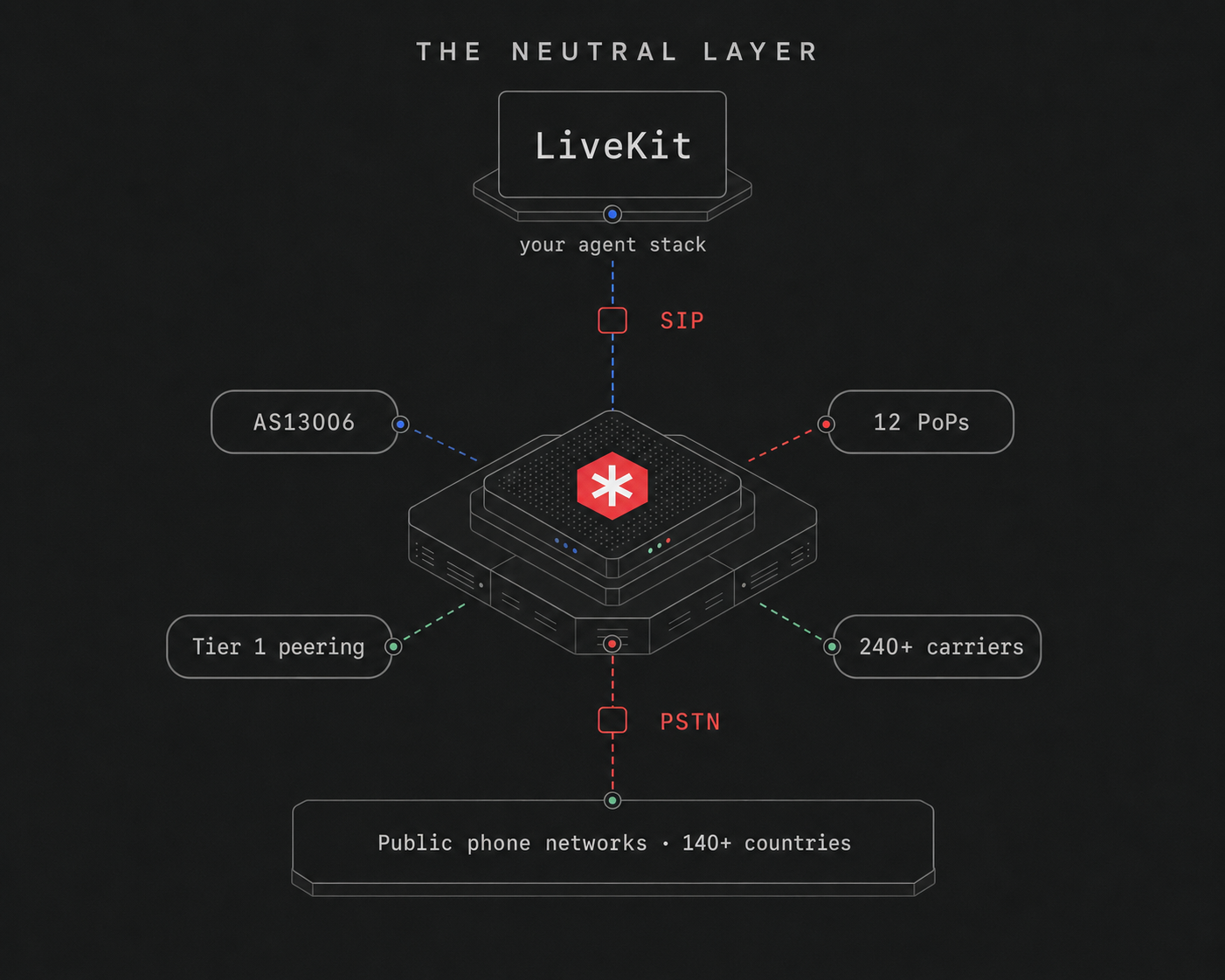
What LiveKit teams get with didlogic

Local and toll-free numbers in 140+ countries, with licensed local voice in 17 of them. Your agent answers on a number that reads as domestic in the market it serves.

12 points of presence and direct carrier agreements on most routes, so calls hand over to the destination network without an extra wholesaler in the middle. On calls that stay on a regional path, 80% add under 20 ms of network latency.

The same SIP account handles calls into your agent and calls your agent places. One account can sit behind several LiveKit projects, or you can isolate them.

TLS for signalling and SRTP for media, which is what LiveKit secure trunking expects on the carrier side.

Paperless porting in eight countries, and porting in 60+ more. Ports are scheduled to avoid downtime.

Our MCP server lets you buy numbers and configure SIP accounts from Claude Code, Cursor or any MCP client. Useful when you are already in an editor building the agent.
Three steps to a live call
-
Step 1
Buy a number
Pick a local or toll-free number in the didlogic portal, in whichever market your callers are in.
-
Step 2
Forward it to LiveKit
Set the number's destination to your LiveKit SIP endpoint. That is what carries inbound callers to your agent.
-
Step 3
Create the trunks in LiveKit
An inbound trunk with a dispatch rule to place callers in a room, and an outbound trunk pointed at your nearest didlogic gateway.
What teams build on LiveKit and didlogic
Inbound callers land in a LiveKit room through a dispatch rule. The agent picks up on a local number, in any market you operate in.
Local caller IDs get answered more often than foreign ones. CLI rotation cycles your number pool on high-volume campaigns.
LiveKit rooms hold more than two participants, so a supervisor can join a live call, and the agent can hand the customer to a person when the conversation needs one.
One agent deployment, local numbers in each market, native-language voices from whichever TTS provider you use.
If your deployment mixes voice agents with video or screen share, the telephony side does not change. We carry the PSTN leg, LiveKit handles the rest.
Three things worth knowing before you build
Call transfers stay inside your number pool. Your agent can hand a live call to a person, but the destination has to be a number on your didlogic account. Transfers to third-party numbers are blocked, and the feature is off until you ask us to turn it on. If your support team sits on a number you do not own, buy it from us and forward it wherever they actually are.
HD audio is best effort. We support G.722, along with G.711, G.729 and GSM. Whether wideband audio survives all the way to the subscriber depends on the carriers in the middle, and often it does not. Design for G.711 quality and treat G.722 as upside.
Numbers are not instant everywhere. Account validation usually completes within 24 hours, and some countries require documents before a number activates. Plan for same-day or next-day rather than seconds.
We would rather you find these out here than three weeks into a build.
VIRTUAL NUMBERS
Pick the country, then pick the number
Callers answer numbers that look like theirs. Browse coverage by country, then provision in the portal.










Documented on both sides
LiveKit publishes a dedicated quickstart for didlogic in its telephony documentation, alongside Twilio, Telnyx, Plivo, Wavix and Sinch. It covers inbound routing, dispatch rules, outbound trunks and troubleshooting, so the configuration path is written down by both parties rather than pieced together from a support thread.
| Capability | Supported | Worth knowing |
|---|---|---|
| Inbound calls to your agent | Yes | One account can sit behind several LiveKit projects |
| Outbound calls from your agent | Yes | Same SIP account, both directions |
| Local and toll-free numbers | 140+ countries | Licensed local voice in 17 |
| TLS and SRTP encryption | Yes | SRTP enabled per number on request |
| Human transfer mid-call | With conditions | Destination must be a number on your didlogic account |
| HD audio (G.722) | Best effort | Many carriers do not preserve wideband end to end |
| IP-based authentication | On request | We create a dedicated SIP account for it |
| Porting your existing numbers | 60+ countries | Paperless in eight of them |
FAQ: SIP trunk for LiveKit Agents
Is didlogic a documented SIP provider for LiveKit?
Yes. LiveKit publishes a dedicated quickstart, “Create and configure a didlogic SIP trunk”, in its telephony documentation, alongside quickstarts for Twilio, Telnyx, Plivo, Wavix and Sinch.
Does didlogic work with LiveKit Cloud?
Yes, and LiveKit Cloud is what both setup guides are written against.
Does didlogic work with self-hosted LiveKit?
A self-hosted deployment running the LiveKit SIP service connects the same way. Neither guide is written against a self-hosted cluster, so talk to us first if that is your setup.
Does it support outbound calls?
Yes. Inbound and outbound run on the same didlogic SIP account.
How long does it take to get a first call working?
Account validation usually completes within 24 hours, and some countries need documents before a number activates. Once the number is live, the LiveKit side is a few minutes of configuration.
Can my agent transfer a call to a human?
Yes, to a number on your didlogic account. Transfers to third-party numbers are not permitted, and the feature is enabled on request.
What audio quality should I expect?
G.711 on most routes. G.722 wideband is supported but many carriers do not preserve it end to end.
What latency should I expect?
On calls that stay on a regional path, 80% add under 20 ms of network latency. Your end-to-end conversational latency is dominated by LiveKit routing and your STT, LLM and TTS providers, which sit above the transport layer.
Can one didlogic account serve several LiveKit projects?
Yes. Numbers and projects stay independent, so you can share an account across projects or isolate them.
How does didlogic compare to Twilio for LiveKit?
Coverage is the main difference: local and toll-free numbers in 140+ countries with licensed local voice in 17, against a smaller direct footprint. See the Twilio alternative for AI voice page.
How does didlogic compare to Telnyx for LiveKit?
Telnyx sells its own voice AI platform alongside its trunks. We do not. The only thing we sell you is the carrier layer under whatever you build on LiveKit.
Can I port an existing number?
Yes. Paperless porting in the Canada, UK, Australia, New Zealand, Netherlands, Switzerland and Spain, and porting in 60+ countries beyond those.
How is it priced?
You pay for numbers, inbound minutes and outbound termination. New accounts start with 30 days at no monthly minimum. See call rates and account levels.
Where is the documentation?
LiveKit’s quickstart and our own guide. Engineering support is at [email protected].
Buy a number, point it at LiveKit, place a call.