
Vapi SIP trunk and phone numbers








A carrier under your Vapi stack, not another platform on top of it
Vapi gives you the assistant, the models, the tools, the workflows and the call control. It does not give you phone numbers outside the US, carrier interconnects or a PSTN footprint. Free Vapi numbers are US area codes only, capped at five per account, and international numbers are not part of that. Everything past that point runs on Bring Your Own SIP Trunk, and that layer is all didlogic does.
We run our own Autonomous System (AS13006), 12 physical points of presence and around 240 direct carrier agreements, and we have been carrying voice since 2006. We do not sell an agent platform, an LLM product or a conversational AI tool. Nothing we ship competes with the stack you chose Vapi to stay open on.
That is worth checking when you compare providers. Several SIP vendors now sell their own voice AI platform next to their trunks, which puts them on both sides of the table. We only have one side.
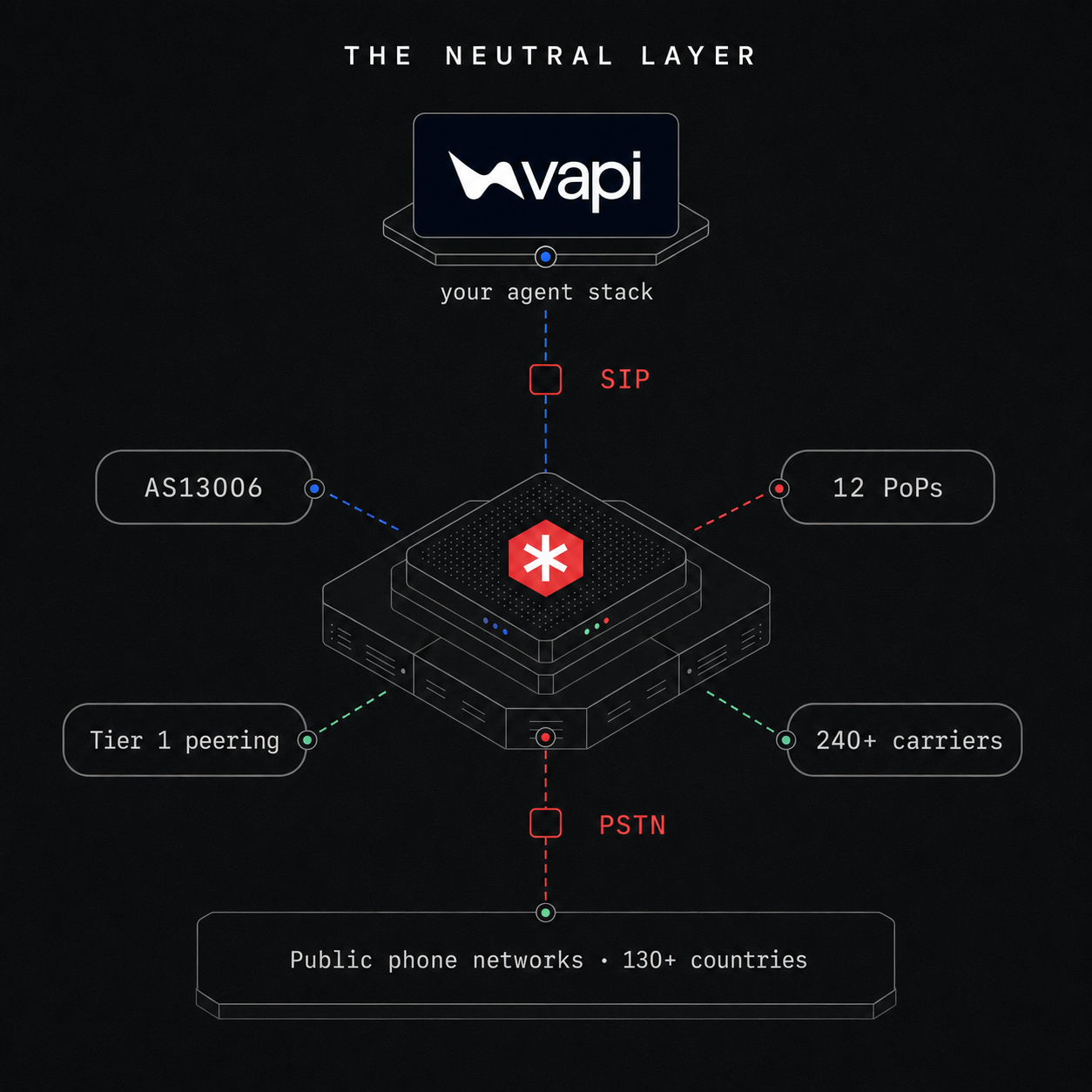
What Vapi teams get with didlogic

Local and toll-free numbers in 140+ countries, with licensed local voice in 17 of them. Your assistant answers on a number that reads as domestic in the market it serves.

12 points of presence and direct carrier agreements on most routes, so calls hand over to the destination network without an extra wholesaler in the middle. On calls that stay on a regional path, 80% add under 20 ms of network latency.

The same didlogic SIP account carries calls into your assistant and calls your assistant places. Point the trunk at your nearest regional gateway and both directions run through it.

TLS on port 5061 for signalling, and SRTP for media on request. Vapi supports TLS signalling in both its US and EU regions.

Paperless porting in eight countries, and porting in 60+ more. Ports are scheduled to avoid downtime.

Our MCP server lets you buy numbers and configure SIP accounts from Claude Code, Cursor or any MCP client. Useful when you are already in an editor building the assistant.
Three steps to a live call
-
Step 1
Buy a number
Pick a local or toll-free number in the didlogic portal, in whichever market your callers are in.
-
Step 2
Create the trunk in Vapi
Add a SIP trunk credential pointed at your nearest didlogic gateway, then import the number as a BYO SIP Trunk Number.
-
Step 3
Point the number at Vapi
Set the number's destination to your Vapi SIP URI. Place a test call.
What teams build on Vapi and didlogic
Inbound callers reach the assistant assigned to the number. The agent picks up on a local number, in any market you operate in.
Local caller IDs get answered more often than foreign ones. CLI rotation cycles your number pool on high-volume campaigns. Caller ID passthrough is available from the Plus account level.
Your assistant can hand a live call to a person with a SIP REFER transfer, using Vapi’s Transfer Call tool with Blind Transfer selected. Read the constraints below before you design around it.
Outbound reminder calls placed from Vapi, single or as a batch campaign, on numbers that read as local in the market you are calling.
One Vapi deployment, local numbers in each market, native-language voices from whichever TTS provider you use.
Free Vapi numbers stop at the US border. didlogic sources numbers in 140+ countries, including markets most carriers will not touch, with licensed local voice in 17.
Four things worth knowing before you build
Transfers are restricted, and off by default. SIP REFER is disabled until you ask us to enable it. Once enabled, an inbound call can only be referred to another number purchased on your own didlogic account. A referral to a third-party number or a number on another account returns 403 Forbidden. Outbound transfers go to PSTN numbers only, not SIP URIs. And a failed REFER drops the call rather than returning it to the original party, so build a fallback.
Vapi will not let you switch trunks on an existing number. If you need to move a number to a different SIP trunk credential, you delete the phone number in Vapi and create it again against the new trunk. Plan for that before you have fifty numbers in production.
HD audio is best effort. We support G.711 u-law and a-law, G.729 and GSM. G.722 is supported but availability is limited, and many carriers do not preserve wideband end to end. Design for G.711 quality and treat G.722 as upside.
Numbers are not instant everywhere. Account validation usually completes within 24 hours, and some countries require documents before a number activates. Plan for same-day or next-day rather than seconds.
We would rather you find these out here than three weeks into a build.
VIRTUAL NUMBERS
Pick the country, then pick the number
Callers answer numbers that look like theirs. Browse coverage by country, then provision in the portal.










Documented on both sides
Vapi publishes a dedicated didlogic page in its SIP integration documentation. It covers outbound calling, inbound routing, testing and SIP REFER transfers, so the configuration path is written down by both parties rather than pieced together from a support thread.
didlogic is also listed in the Vapi partner directory as a Technology Partner under Telephony / CPaaS.
| Capability | Supported | Worth knowing |
|---|---|---|
| Inbound calls to your assistant | Yes | Routed by SIP URI to your Vapi credential ID |
| Outbound calls from your assistant | Yes | Same didlogic SIP account, both directions |
| Local and toll-free numbers | 140+ countries | Licensed local voice in 17 |
| Vapi US and EU regions | Both | Keep the Vapi API region and SIP host on the same side |
| TLS signalling | Yes | Port 5061. Use 5060 unless you need encrypted signalling |
| SRTP media encryption | On request | Configure the Vapi gateway with the tls/srtp outbound protocol |
| Username and password authentication | Yes | Five-digit didlogic SIP login |
| IP-based authentication | On request | We create a dedicated SIP account for it |
| Human transfer mid-call (SIP REFER) | With conditions | Off by default. Inbound transfers restricted to numbers on your account |
| Codecs | G.711 u-law, G.711 a-law, G.729, GSM | G.722 supported, availability limited |
| DTMF | In-band, RFC 2833 / RFC 4733 | Choose one and keep it consistent end to end |
| Custom SIP headers | Yes | Preserved on inbound INVITE |
| Porting your existing numbers | 60+ countries | Paperless in eight of them |
FAQ: SIP trunk for Vapi assistants
Is didlogic a documented SIP provider for Vapi?
Yes. Vapi publishes a dedicated didlogic page in its SIP integration documentation, next to Twilio, Telnyx, DIDWW, Zadarma, Plivo and Amazon Chime SDK. didlogic is also listed in the Vapi partner directory as a Technology Partner under Telephony / CPaaS.
Which Vapi region should I use, US or EU?
Whichever region your Vapi organization is hosted in, and then keep everything on that side. US organizations use sip.vapi.ai; EU organizations use sip.eu.vapi.ai and create their credential and BYO number through api.eu.vapi.ai rather than api.vapi.ai. Mixing an EU API region with the US SIP host is a common cause of calls that never arrive.
What exactly goes in the inbound SIP URI?
Your number and your Vapi SIP trunk credential ID: YOUR_NUMBER@YOUR_CREDENTIAL_ID.sip.vapi.ai, or ...sip.eu.vapi.ai in the EU. Use the credential ID, not your Vapi private API key. Set it in the didlogic portal under the number’s destination, with destination type SIP URI, and keep it at the top of the destination list if you have others configured.
Which didlogic gateway do I point the Vapi trunk at?
The regional gateway closest to where your traffic originates, for example sip.nl.didlogic.net. The full list is in our outbound calling guide. Use port 5060 unless you specifically need TLS, in which case use 5061.
Why do my outbound calls fail with a 503 provider fault?
The most common cause we see is the trunk configured on port 5061 without TLS, where it should be 5060. Check the port and the outbound protocol on the Vapi SIP trunk credential first, before you look anywhere else.
What does "Multiple accounts are attempting to default route this carrier" mean?
It means two Vapi Phone Number entries are configured with the same phone number, so Vapi receives the inbound call and cannot decide which one owns it. Delete the duplicate Phone Number and the trunk it sits on, and the call routes normally.
Why did authentication suddenly start failing after a burst of retries?
Vapi signals from a small set of static IP addresses. If a run of authentication attempts fails, our platform blocks that source IP for five minutes, which affects the shared address rather than just your account. Fix the credentials, or ask us to move you to IP-based authentication with a technical prefix, which removes password authentication from the path entirely.
Can I switch an existing Vapi number to a different SIP trunk?
Not in place. Vapi does not currently allow a Phone Number to be moved between SIP trunk credentials, so you delete the number in Vapi and create it again against the new trunk.
Can my assistant transfer a call to a human?
Yes, with conditions. SIP REFER is disabled by default on didlogic accounts and has to be enabled for you, so ask before you build against it. Once it is on, create a Transfer Call tool in Vapi with a SIP destination in the form sip:+E164_NUMBER@YOUR_DIDLOGIC_GATEWAY and keep Blind Transfer selected, which is what makes Vapi send a REFER. Inbound calls can only be referred to another number purchased on your own didlogic account; anything else returns 403 Forbidden. Outbound transfers support PSTN numbers only. If a REFER fails, the call drops rather than returning to the original party.
How is a transferred call billed?
As two legs. The original leg is billed at its own rate for the full duration of the call, including the time after the transfer, and appears as two transactions. The transferred leg is billed from the moment of the REFER at the rate of the destination number. Both legs show up as separate entries in your call history, marked with a transfer icon. Inbound calls referred to another number on the same account are not billed twice for the internal move unless that destination forwards on to the PSTN.
What do I need to allowlist?
On the Vapi side, its signalling IPs on ports 5060 and 5061, and UDP 40000 to 60000 for RTP media. Vapi publishes the current addresses per region in its networking and firewall reference, and they differ between US and EU, so read them from there rather than copying them from a blog post. On the didlogic side, allow RTP audio on ports 10000 to 20000 from any IP, because our media IPs are numerous and change, and allow signalling by DNS name rather than static IP. If you cannot allow inbound RTP from any IP, contact support and we will share a specific list.
Can I use IP authentication instead of a username and password?
Yes. Contact support and we will create a dedicated SIP account with IP authentication for you. Worth knowing that Vapi does not generally recommend IP-based authentication on shared SBCs unless the provider issues a unique termination URI, so username and password remains the simpler default for most setups.
Which codecs and DTMF methods are supported?
G.711 u-law (PCMU), G.711 a-law (PCMA), G.729 and GSM. You can force a specific codec on your side and our SBC will comply where possible. G.722 wideband is supported but its availability is limited and many carriers do not preserve it end to end. For DTMF we support in-band and RFC 2833 / RFC 4733 RTP events.
Can I get numbers in countries Vapi does not offer directly?
Yes. Vapi-managed free numbers are US area codes only and capped at five per account, and international numbers are not included. didlogic sources local and toll-free numbers in 140+ countries, with licensed local voice in 17. Once the number is on your didlogic account it imports into Vapi like any other BYO SIP trunk number.
Can I port my existing numbers to didlogic?
Yes. Paperless porting in eight countries and porting in 60+ more, with ports scheduled to avoid downtime. Porting is available on Business and Wholesale level accounts. A common pattern is porting numbers off another carrier to didlogic while keeping that carrier for SMS or other rails. Vapi’s BYO setup does not care which carrier owns the number.
What latency should I expect?
On calls that stay on a regional path, 80% add under 20 ms of network latency. Your end-to-end conversational latency is dominated by Vapi routing and your STT, LLM and TTS providers, which sit above the transport layer. Choosing the didlogic gateway and the Vapi region closest to your traffic is the part you control at the carrier layer.
How does didlogic compare to Twilio for Vapi?
Coverage and billing model are the two differences that matter. Local and toll-free numbers in 140+ countries with licensed local voice in 17, against a smaller direct footprint, and no per-channel charges on the carrier side. The Vapi platform fee is the same either way. See the Twilio alternative for AI voice page.
How is it priced?
You pay for numbers, inbound minutes and outbound termination. New accounts start with 30 days at no monthly minimum. See call rates and account levels.
Where is the documentation?
Vapi’s didlogic guide and our own guide. Engineering support is at [email protected].