












Dialer routes for high-volume outbound calling

Connect your existing dialer over SIP for outbound campaigns and short-duration calls. Work with didlogic to review routes, caller ID and capacity for your contact center or BPO.
Trusted by
Dialer VOIP Termination

Keep your dialer. Connect your campaign traffic.

Your dialer manages calling lists, campaign pacing and agent workflows. didlogic provides the SIP connection and carrier routing that deliver outbound calls to fixed and mobile networks.

Share your destinations, call-attempt volumes and expected call durations. The team reviews your traffic profile and connection requirements before configuring the setup.

Keep your dialer. Connect your campaign traffic.
CAMPAIGN REQUIREMENTS

Routes reviewed around your calling patterns

Dialer and short-duration traffic

Describe your campaigns, including predictive dialling, automated calls and frequent short calls. didlogic reviews the traffic profile and routing requirements before you move it into production.

Destination coverage

Share the countries, networks and number ranges you need to reach. Confirm availability for your campaign traffic and caller-ID requirements before activation.

Call attempts and concurrency

Provide your expected peak calls per second and the number of simultaneous calls. The team reviews capacity, account limits and security requirements against your campaign’s expected load.

Caller-ID presentation

Discuss the numbers you need to display on outbound calls. Presentation depends on the selected route and destination, so validate caller-ID delivery during testing.

CALLER ID AND NUMBER CHECKS

Add the tools your campaign needs

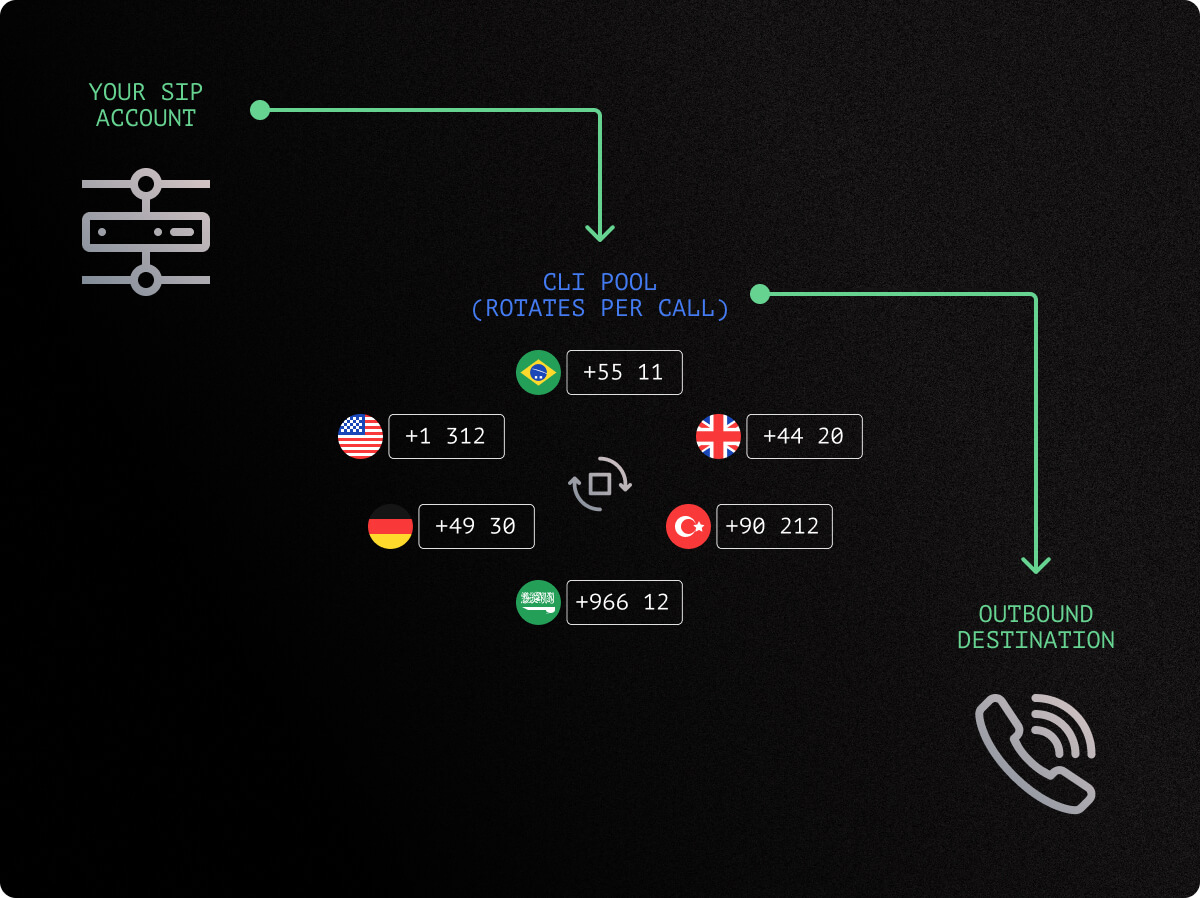
CLI rotation

Rotate caller IDs from an eligible pool of didlogic numbers. After the team activates the setup, manage participating numbers through your SIP account settings. Availability depends on your account level, destination and number configuration.

Answering Machine Detection

AMD analyses answered calls to classify the response as human or automated. Configure it for agreed destination prefixes and test its behaviour before launch, including how it handles voicemail and IVRs.

HLR lookups

Use the HLR API to check number validity, phone type, carrier and porting information. Access requires activation. Review the returned information when preparing your calling lists.

GET CONNECTED

From campaign requirements to live calls

Review your setup, test representative calls and prepare for production with the didlogic team.
  1. Step 1

    Share your traffic

    Create your account and provide your dialer platform, destinations, call volumes, expected durations and capacity needs.

  2. Step 2

    Connect and test

    Configure SIP and the agreed calling tools. Check call completion, caller ID, audio and any AMD behaviour your campaign depends on.

  3. Step 3

    Launch gradually

    Confirm production readiness and commercial terms, then increase traffic according to the agreed launch plan.

Explore other voice services

Outbound voice

Connect a business’s existing phone system or application to fixed and mobile networks for its own outbound calls.

Wholesale A-Z termination

International termination for carriers, ITSPs, and resellers that carry voice traffic for their customers.

Virtual phone numbers

Add inbound numbers and route incoming calls to your communications system.

Dialer routes FAQ

What is dialer VoIP termination?

Dialer VoIP termination delivers calls from a dialer platform to fixed and mobile telephone networks over SIP. didlogic reviews the setup around your destinations, calling patterns, caller IDs and capacity requirements.

Can I connect my existing dialer?

The service connects over SIP. Share your platform and connection requirements so the team can review authentication, number formatting, audio and routing, then validate the configuration with test calls.

Do you support short-duration traffic?

Yes, subject to review of your traffic profile and destinations. Describe your expected call durations and calling patterns before activation, including any predictive dialling or automated campaigns.

What capacity do I need for a dialer?

Provide both your peak calls per second, which measures new call attempts, and your expected concurrent calls, which measures calls active at the same time. The team reviews these requirements against your account configuration and planned destinations.

Can I rotate caller IDs?

Yes, with an eligible CLI rotation setup. Your account manager arranges activation, after which you can select participating numbers through your SIP account settings. The documented setup uses eligible didlogic numbers with local calling support.

What is Answering Machine Detection, and how does it handle IVRs?

Answering Machine Detection, or AMD, analyses audio after a call is answered to classify the response as human or automated. didlogic’s AMD disconnects calls classified as machine-answered and does not distinguish voicemail from an IVR. Test both types of response before enabling it for your campaign.

Can I check my calling lists before launching?

HLR lookups can return number validity, phone type, carrier and porting information through the API once access is enabled. HLR does not check Do Not Call registration; DNC screening is a separate capability.

Where can I find call rates?

View our published call rates. Contact the didlogic team to confirm the rates and terms applicable to your dialer traffic.

Can I test before launching a campaign?

Testing forms part of technical onboarding. Agree the scope and terms with the team, then validate your destinations, caller-ID presentation, audio and optional calling tools before moving production traffic.

Request dialer routes

Ready to move your campaign traffic?