
SIP trunking is a method of connecting a business phone system to the public telephone network over an IP connection instead of physical phone lines. A SIP trunk is a virtual connection between your PBX, contact-center platform, or voice application and a provider’s network: outbound calls travel over it to reach ordinary mobile and landline numbers, and inbound calls to your phone numbers arrive through it. The trunk uses SIP for call signaling and RTP for the audio, and it replaces traditional circuits such as analog lines and ISDN PRI.
The practical difference is that a SIP trunk is defined in software, not copper. There is no physical circuit to install, capacity is a configuration setting rather than a wiring project, and one trunk can carry phone numbers from many cities and countries at once. This is why SIP trunking has become the standard way businesses connect phone systems to the public switched telephone network (PSTN).
Quick facts
| Question | Short answer |
|---|---|
| What is a SIP trunk? | A virtual connection carrying phone calls between your phone system and a carrier over IP |
| What does it replace? | Analog phone lines and ISDN circuits such as PRI and BRI |
| What protocols does it use? | SIP for signaling (RFC 3261) and RTP for audio (RFC 3550) |
| What do I need on my side? | A SIP-compatible PBX, contact-center platform, or voice application, plus an internet or private IP connection |
| How many calls can it carry? | Many simultaneous calls per trunk; capacity is set by the provider and your service plan, not by physical wiring |
| Can it carry my numbers? | Yes. DIDs from multiple cities and countries can be routed to a single trunk, and existing numbers can usually be ported in |
What SIP trunking replaces
For decades, connecting a PBX to the phone network meant ordering physical circuits from the local telephone company. An analog line carried one call. An ISDN PRI circuit carried a fixed bundle of channels: 23 in North America, 30 in Europe. If your business grew past that capacity, you ordered another circuit and waited for installation. If you opened an office in another country, you repeated the entire process with a different telco.
Each circuit also tied your phone numbers to a physical location. The numbers lived on the line, and the line ended at your building.
SIP trunking removes both constraints. The connection is a stream of IP packets over infrastructure you already have, and the numbers are entries in the provider’s routing configuration rather than properties of a wire. Capacity, destinations, and numbers all become things you change in a portal or through an API instead of things you order from a field technician.
How SIP trunking works
A SIP trunk involves a small set of components working together:
Your phone system. A SIP-compatible PBX, contact-center platform, softphone fleet, or voice application. It generates outbound calls and receives inbound ones. Almost every modern phone system speaks SIP natively.
Authentication. The provider needs to know the traffic is really yours. Trunks are typically secured by IP address allowlisting (the provider accepts traffic only from your known addresses), by SIP registration with credentials, or both.
Signaling and media. Call setup, ringing, answer, and hangup are SIP messages. The voice itself travels as RTP streams, negotiated per call. These are separate flows, which matters for firewall configuration and troubleshooting.
Numbers on the trunk. Inbound phone numbers, usually provisioned as DIDs, are pointed at the trunk in the provider’s routing. A single trunk can receive calls for one number or thousands, from one country or many.
The provider’s network. On the far side, the provider routes outbound calls to the correct destination carrier anywhere in the world (termination) and delivers inbound calls from the PSTN to your trunk (origination). Calls flow in both directions over the same trunk.
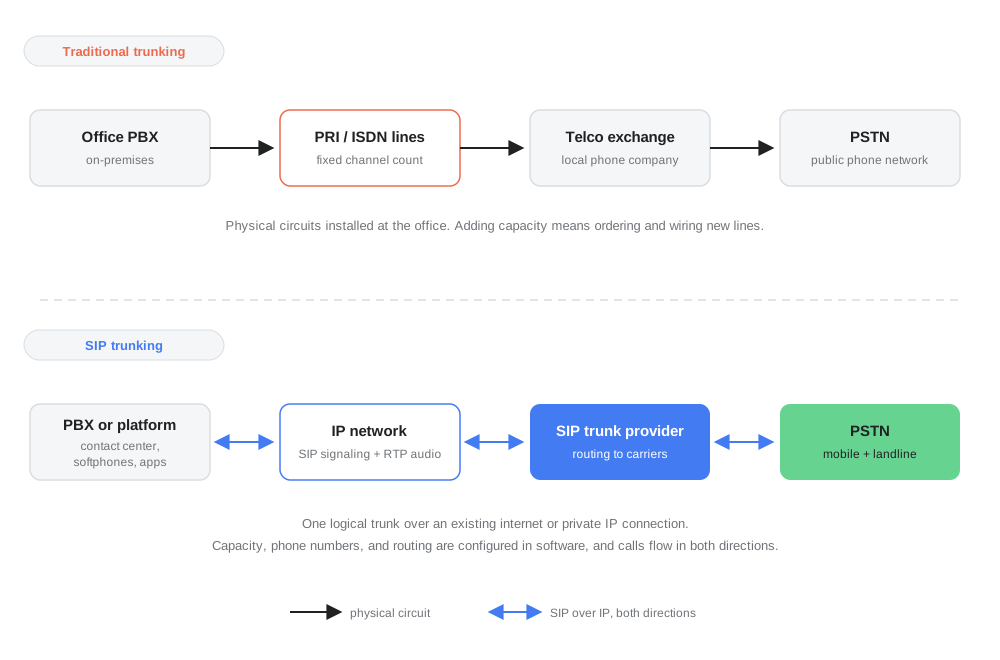
Traditional trunking compared with SIP trunking: physical circuits with fixed capacity at a single location, versus one software-defined trunk over IP that carries calls in both directions and scales by configuration.
An optional but recommended element at the business edge is a session border controller (SBC) or a properly configured firewall, which handles security, NAT traversal, and interoperability between your equipment and the provider.
SIP trunk vs the concepts it is confused with
SIP trunking vs SIP. SIP is the protocol; SIP trunking is a service built on it. Saying “we use SIP” describes your technology, while “we have a SIP trunk” describes a commercial connection to a carrier.
SIP trunking vs VoIP. VoIP is the broad category of voice over IP. SIP trunking is one specific application of it: connecting a phone system you operate to the public network. A consumer calling app is also VoIP but is not a SIP trunk.
SIP trunking vs hosted PBX. With SIP trunking, you run the phone system (on premises or in your own cloud) and buy only connectivity. With a hosted or cloud PBX, the provider runs the phone system itself and you buy the whole application. Businesses with their own PBX or contact-center platform need trunking; businesses that want no phone system to manage choose hosted.
SIP trunk vs DID. The DID is the phone number people dial; the trunk is the connection that delivers the call. One trunk carries many DIDs, and a DID can be moved between trunks without changing the number.
SIP trunk vs channel. A channel is one simultaneous call on a trunk. Traditional circuits had a hard physical channel count; on a SIP trunk, the concurrent-call limit is a service setting. Some providers price per channel, while others allow concurrent calls within capacity limits without per-channel fees.
Why businesses switch to SIP trunking
Lower and simpler costs. No physical circuit rental, no separate contracts per location, and international calls routed at carrier rates rather than legacy telco pricing.
Capacity that follows demand. A seasonal contact center can run far more concurrent calls in peak weeks without waiting for line installations, because capacity is provisioned in software.
Geographic reach from one connection. A single trunk can hold local numbers in dozens of countries, so a company can answer a Berlin number, a Singapore number, and a São Paulo number on the same platform.
Consolidation. Multi-site businesses replace a patchwork of local telco circuits with one provider relationship and one routing configuration.
Resilience. Because numbers are not welded to a physical line, inbound calls can be rerouted to a backup trunk, another site, or a forwarding destination when something fails. With physical circuits, an outage at the building meant the numbers were unreachable.
What to evaluate when choosing a SIP trunk provider
- Coverage. Which countries and cities can the provider supply numbers in, and where can it terminate calls reliably? Verify the specific destinations you need rather than relying on general coverage statements.
- Capacity and limits. Concurrent call limits, calls-per-second limits, and how quickly they can be raised.
- Number portability. Whether your existing numbers can be ported in, what documents are required, and how cutover is managed.
- Security options. Support for TLS signaling and SRTP media encryption, IP allowlisting, and fraud controls such as destination blocking and spend limits.
- Codec support. At minimum G.711 and usually Opus or G.722 for HD audio; confirm compatibility with your platform.
- Interoperability. Documented configurations for your PBX or platform, and a straightforward test process before you commit traffic.
- Redundancy. Multiple points of presence, failover routing for inbound numbers, and what happens to your calls if one network element fails.
- Compliance. Registration and identity requirements for numbers in regulated countries, and the provider’s licensing status in the markets that matter to you.
Where didlogic fits
didlogic is a SIP trunk provider: it operates the carrier network between a customer’s phone system and the PSTN. Its SIP trunking service carries outbound calls from a PBX, contact-center platform, or voice application to phone networks worldwide, while inbound SIP trunking delivers calls to the customer’s virtual phone numbers over the same connection. Numbers can be provisioned in over 130 countries and pointed at a trunk, a registered SIP device, or a forwarding destination.
The phone system itself, with its extensions, queues, and call logic, remains the customer’s own. didlogic provides the trunk underneath it: the signaling, the media transport, and the routing that connects that system to the public phone network.
FAQs
How many calls can one SIP trunk carry?
As many as your service plan and the provider’s capacity allow. Unlike a PRI circuit with its fixed 23 or 30 channels, a SIP trunk’s concurrent-call limit is a configuration value that can be raised without any physical change.
Do I need special hardware for SIP trunking?
Usually not. Any SIP-compatible PBX or software platform can connect. An SBC or well-configured firewall at the network edge is recommended for security and NAT handling, and legacy non-IP PBXs can connect through a SIP gateway.
Is call quality worse than traditional lines?
Not inherently. Quality depends on the IP path: with adequate bandwidth, low packet loss, and low jitter, SIP trunk audio matches or exceeds legacy circuits, especially when HD codecs are used. Poor internet connectivity, not the technology, is the usual cause of quality problems.
Can I keep my existing phone numbers?
In most cases yes, through number porting. Rules, timelines, and required documents vary by country, so confirm portability for your specific numbers before switching.
How is SIP trunking billed?
Models vary. Common components are a per-number monthly fee for DIDs, per-minute charges for calls, and sometimes per-channel fees for concurrent capacity. Compare the full combination rather than any single rate.
Does a SIP trunk work over the public internet?
Yes, and that is the most common setup. Traffic can be encrypted with TLS and SRTP. Businesses with strict requirements can also connect over private links or direct interconnections where the provider supports them.
Is a SIP trunk the same as a phone line?
Functionally it plays the same role, connecting your phone system to the public network, but it is not a physical line. It is a logical connection over IP, with capacity, numbers, and routing defined in software.
