





 by Vram Bastadjian | December 23, 2025
Never Miss a Call Again: AI Agents Now Available in the didlogic Mobile App
Missed calls cost small businesses over $60 billion in lost revenue every year, and 85% of callers never try again, according to recent research from Invoca.
This means inbound calls still still drive a significant share of business leads, so speed matters. And while human receptionists have limits — hours, bandwidth, cost — AI receptionists don’t. They answer instantly, operate 24/7, and handle routine inquiries without pause. Businesses using AI agents see labor costs drop by up to 90% and gain the ability to scale call handling without scaling headcount.
That’s why we’ve built AI agents directly into the didlogic mobile app. You can now assign intelligent virtual receptionists to your business numbers, customize their knowledge, and turn every incoming call into a structured, searchable conversation, all from your phone.
Below, we’ll break down what AI agents in the app can do, how to set them up, and how they fit into your broader communications strategy.
What AI agents in the mobile app can do
In the new didlogic mobile app release, you can assign intelligent agents to answer calls, collect details, and route leads automatically, all without involving your team in routine tasks.
These AI agents work right inside the mobile app, acting as receptionists, sales assistants, or support reps — depending on the role you assign. They don’t just answer the phone; they understand your business, respond in context, and log every interaction.
Here’s what they’re capable of out of the box:
- Role-based behavior: Assign agents to specific tasks like inbound sales, support, or general reception. Each role is optimized for different kinds of interactions.
- Context awareness: Link your website or upload docs like FAQs and service guides so your agent can respond with business-specific answers.
Smart routing: Attach an agent to any of your didlogic numbers. Incoming calls are answered automatically, and fallback routing to a human number is available if needed. - Instant logging: Calls answered by AI are flagged with an icon in your call history. A new contact is created or updated, and an AI-generated call summary is added.
- Contact-level insights: Over time, your AI agent builds a conversation summary for each contact — turning unstructured conversations into structured data.
Whether you’re a solo founder or managing a remote support team, AI agents take the pressure off by turning high-volume calls into clean, logged, and categorized insights ready for follow-up or review.
How to set it up
Getting started with tailor-made AI agents in the didlogic mobile app takes just a few minutes. There’s no need for a desktop login or third-party integration; everything happens in the app.
Here’s how to set it up:
1. Install the app and sign in
Download the didlogic mobile app from the App Store or Google Play. Log in using your email and password.
2. Create your AI agent
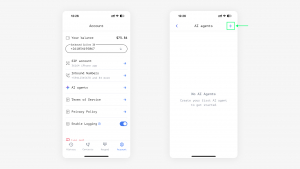
Navigate to: Account → AI Agents
- Give your agent a name.
- Choose a role: Receptionist, Sales, or Support.
- (Optional) Add a human fallback number if you want callers to reach a person on request.
3. Add a Knowledge Base
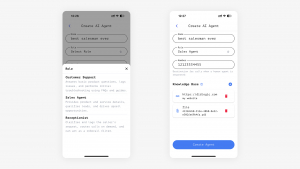
To help the AI respond accurately, link your website or upload documents — FAQs, service descriptions, or common workflows.
This gives the agent real context about your business and helps it provide relevant answers.
4. Assign the agent to a number
Once saved, the app will prompt you to assign the AI agent to one of your inbound numbers. You can do this immediately or return to it later.
5. Configure inbound routing
Go to: Inbound Numbers
- Select a number.
- Add your mobile SIP account as a destination.
- Add your AI agent as another destination.
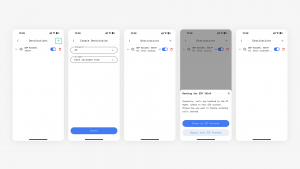
An AI icon will appear in the app when the agent is active, so you’ll always know which calls are being handled automatically.
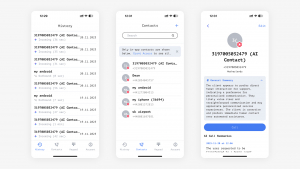
What happens when the AI answers
Once your AI agent is live and assigned to a number, every call it handles is tracked and logged — just like a regular call. But instead of a voicemail or missed interaction, you get structured data and a clear picture of what happened.
Here’s what to expect:
- AI-flagged call history: Every AI-handled call appears in your call history with a dedicated icon, so it’s easy to spot.
- Automatic contact creation: If the number isn’t in your contact list yet, the system creates a new contact automatically.
- AI-generated call summaries: Each call includes a concise summary written by the AI — so you can scan what was discussed without listening to recordings.
- Ongoing contact insights: As more calls come in from the same number, the app builds a running summary on the contact card. You’ll see a snapshot of previous topics, questions, or requests — useful for future follow-ups.
This turns your mobile app into a lightweight CRM, with conversation context built-in and searchable. You’ll spend less time updating records and more time acting on real leads.
Smarter calls, zero overhead
AI receptionists in the didlogic mobile app answer calls, capture leads, organize contact data, and keep your business responsive around the clock. Without adding headcount or switching platforms, you can now log every inbound conversation, reduce manual work, and never miss a valuable opportunity.
Setup takes minutes. The impact lasts much longer.
And with built-in support for Bring Your Own Bots, your AI agent doesn’t have to be generic. It can reflect your brand voice, product knowledge, and sales strategy — right out of the box.
Try the new AI agent feature in your mobile app, put it to work, and let us know how it’s going.
Want to plug in your own logic or LLM workflows? Didlogic lets you Bring Your Own Bots so you can tailor AI behavior using your own backend or preferred platforms.